Public policy moves fast. Staying on top of all the updates and keeping track of important bills is the key to success. Plural’s public policy tracker is your go-to tool for staying on top of legislative updates that matter to you.
Get updates on bills you and your workspaces are tracking, collaborative notifications from teammates, and even recommended bills. It’s all about staying connected and informed. Notifications in Plural’s public policy tracker are like your personal legislative assistant, keeping you informed about the latest bill activities, search updates, and workspace interactions. Whether it’s a new bill that matches your search criteria or an update in your workspace, Plural ensures you don’t miss a beat.
Preparing for new legislative sessions requires more than just understanding policies and laws. Effective policy work stems from having organized and efficient policy tracking system.
As the 2024 legislative sessions approach, this includes ensuring you’ve optimized your workspaces in Plural. To help you prep for success in the 2024 sessions, we’ve put together a quick guide on organizing your workspaces in Plural. Learn more from Dominique, a member of our Customer Experience team at Plural.
Key Tips
Clean up tracked bill lists to avoid missed opportunities.
Untrack unnecessary bills to keep your workspace uncluttered.
Manage tags to organize the bills you’re monitoring.
Update saved searches with modified criteria to never miss an update.
Modify notification settings to streamline your inbox.
Schedule a Training
Keeping your team well-trained ensures everyone’s proficiency in Plural. If you’d like to schedule a refresher or introductory training, reach out to us now at support@pluralpolicy.com.
Get Started With Plural’s Policy Tracking System
By organizing your Plural workspaces, you’re not just preparing for the next session – you’re building a foundation for ongoing success. Ready to get started with Plural? Many of the workspace features covered today are available to users of our Premium plan. Explore our plans and begin your journey towards a more efficient legislative process.
Preparing for legislative sessions requires more than just understanding policies and laws. Effective policy work stems from having an organized and efficient workspace. When it comes to public policy, organization tools are key. As the 2024 legislative sessions approach, it’s crucial to optimize your workspaces in Plural. Here’s a practical guide to help you and your team hit the ground running.
Step 1: Streamline Bill Tracking
Keeping track of relevant bills is the backbone of legislative work. However, cluttered tracking lists can lead to missed opportunities and inefficiencies.
Untrack Outdated Bills
Start by clearing out bills that no longer align with your goals. Untracking these bills simplifies your workspace. With a simplified workplace, you’ll have a more focused approach to upcoming sessions. The bulk untracking feature in Plural is a lifesaver here, saving you precious time.
Pro Tip: Historical records are invaluable. Before untracking, create a new tag for the session year and assign it to past session bills. This way, you maintain a clean workspace without losing important historical data.
Step 2: Tag Management
Tags are more than just labels. In Plural, tags are a powerful tool for categorizing and retrieving information.
Reorganize Your Tags
Review and update your tags. This involves adding new tags for emerging topics or deleting obsolete ones. It’s also key to review your naming conventions to ensure consistency. Well-organized tags lead to quicker access and better management of legislative documents.
Step 3: Saved Searches
Legislative landscapes evolve rapidly. Your saved searches should reflect these changes to keep you ahead of the curve.
Refine Your Searches
Examine your list of saved searches. Modify search criteria to align with new legislative priorities. Delete searches that have become irrelevant to streamline your work. This step ensures that you’re only one click away from the most up-to-date information.
Step 4: Notification Settings
In the fast-paced legislative environment, a missed update is a missed opportunity.
Optimize Alerts
Adjust your notification settings to balance staying informed without being overwhelmed. This includes fine-tuning the frequency of alerts. It’s also key to ensure you’ll be notified about important teammate interactions.
Additional Steps for Administrators
An administrator, your role is pivotal in workspace optimization.
Update User Permissions
Regularly reviewing user access levels is key to maintaining security and efficiency. Remove access for those who have departed, and adjust levels for current team members as their roles evolve.
Create New Workspaces for New Initiatives
Anticipate the needs of future legislative sessions by creating and organizing new workspaces now. This foresight allows for a smooth transition when new projects arise.
Complete a Training for Team Cohesion
A well-trained team is a well-oiled machine. Arrange for refresher courses or introductory training for new members. This ensures everyone is proficient in using Plural, maximizing team efficiency.
By organizing your Plural workspaces, you’re not just preparing for the legislative session. You’re setting a foundation for ongoing success and efficiency. Policy organization tools are a key aspect of your success throughout the legislative session. Remember, the time invested now in optimizing your workspace pays dividends in the fast-paced world of public policy.
Get Started With Plural’s Policy Organization Tools
With Plural’s workspaces, it’s easier than ever to shape the future of public policy. Harness the power of Plural’s intuitive, AI-powered legislative tracking, organization, and stakeholder collaboration tool and get started today. Book a demo to learn more!
Use this guide to determine if Plural is the ideal fit for your organization’s needs. Plural streamlines your legislative tracking process, making it simpler and more efficient.
Deciding if Plural Is Your Ideal Software Solution
To determine if Plural is the right tool for you, consider these key questions.
Comprehensive Bill Tracking and Policy Data
Are you responsible for covering one or more policy areas for your organization?
Plural’s extensive data covers all 50 states, Washington, D.C., Puerto Rico, and U.S. Congress. (Plus Nigeria and South Africa!) This includes all bills and resolutions submitted to each legislature. Further, Plural offers comprehensive legislator, committee, and jurisdictional information.
With Plural, it’s easy to search for bills in your key policy areas. You’ll receive automatic, real-time updates on the bills you’re tracking. With Plural, you’ll always be informed about the latest legislative developments.
Enhancing Collaboration, Communication, and Information-Sharing
Do you collaborate with colleagues and external stakeholders on policy coverage?
At Plural, we know effective policy work doesn’t happen in a vacuum – it’s a collaborative effort. That’s why we never charge per seat, so you can add every member of your team, plus external stakeholders. Plus, Plural offers unlimited, free onboardings and trainings. We’re your partner in ensuring that your entire team is making the most of Plural.
Is communication and organization a pain-point within your team?
Plural allows for efficient organization of conversations about bills, replacing cumbersome email chains. Create unlimited, secure workspaces to collaborate with your team. Organize workspaces by issue area, jurisdiction, client, and more. Use annotation and note-sharing tools to share crucial policy information with team members. Plural ensures everyone is on the same page.
Is it beneficial for you to share information with external allied organizations?
Plural enables you to invite external organizations to your Workspaces. This fosters easier collaboration and information sharing on legislative matters. Plus, Plural’s public tags offer a clear, customizable system to organize and share bills. Plural transforms how policy teams manage, categorize, and communicate legislative information.
Leveraging AI Tools for Enhanced Legislative Insights
Are you looking to leverage AI tools for deeper policy insights?
Plural offers revolutionary AI tools offering insights, trend analysis, and legislative forecasts. With Plural, it’s easy to use AI to deepen your policy insights.
Find similar bills, including companion, reintroduced, and omnibus bills, all in one place. Search across jurisdictions to understand the legislative landscape of a given issue area. Discover which bills are likely to gain momentum and adapt your strategy.
Assessing Satisfaction with Current Legislative Tools
Are you relying on a spreadsheet and state legislative websites for policy tracking?
Plural eliminates the risk of missing important updates on bills you’re monitoring. Receive instant updates on bill updates, like amendments or committee changes. Further, you can make use of tags for convenient labeling, easy access, and seamless organization.
Are you satisfied with your current legislative tracker and policy management setup?
Plural offers a more streamlined, intuitive approach to keeping up with legislative developments. Its seamless design, premium data, and organizational capabilities will enhance your experience. More and more policy experts are making the switch from legacy tools to Plural.
Get Started With Plural‘s Policy Tracking Tool in 2024
You deserve a legislative tracking tool that works with you, not against you. Plural will simplify and enhance your public policy work.
When it comes to superior data, a commitment to innovation, an easy-to-use tool, and personalized support, Plural stands out as a top choice for policy tracking tools in 2024.
Interested in learning more? Create a free account or book a demo today.
In the world of public policy, every decision can shape the future, and every second counts. How can artificial intelligence help? Plural’s AI-powered policy tracker is the legislative tracking tool of choice for impactful policy teams.
AI is a pivotal ally for policy teams — helping to analyze patterns, predict outcomes, and unlock insights at unprecedented speed. It’s clear that AI is a transformative force for policy teams, enhancing their efficiency and driving impactful and informed decision-making. At the cutting edge of public policy work, AI isn’t just about moving faster — it’s about working smarter, turning data into decisions, and insights into results.
Plural’s AI-Powered Tools
Plural stands at the forefront of the AI revolution. With our Premium plan, you’ll unlock a suite of AI-powered features designed for those who demand excellence in their legislative tracking, stakeholder management, and organizational tools. Plural’s AI-powered policy tracker is the policy tracking tool of choice for impactful policy teams.
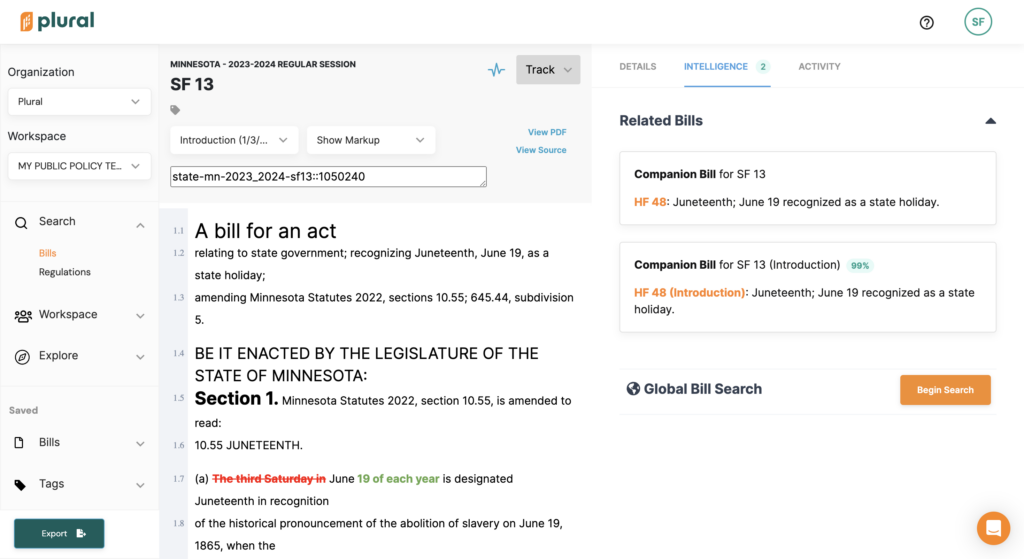
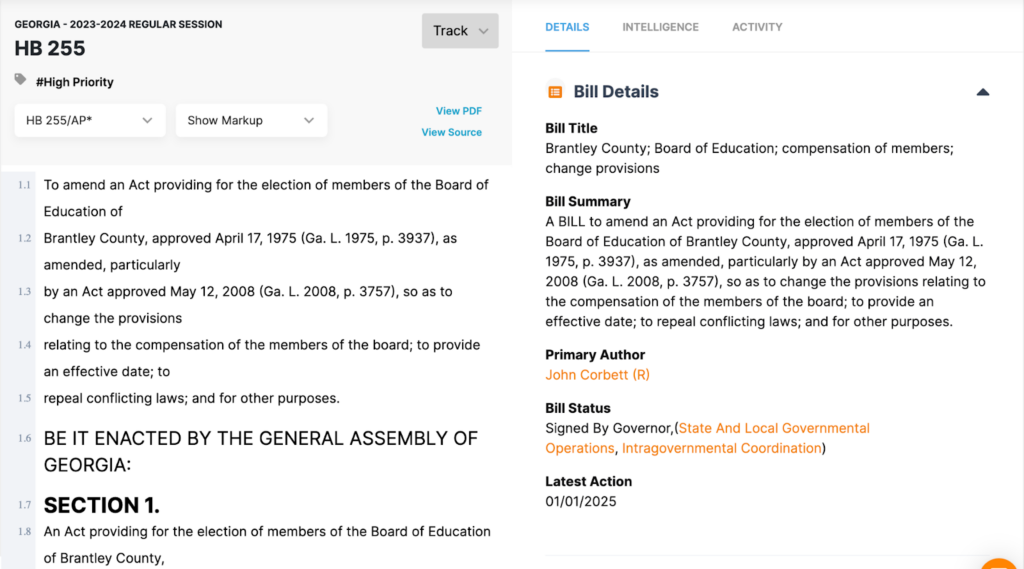
With Plural, it’s easy to discover similar bills, like companion bills. Find all related bills in the “Intelligence” tab of a bill detail page.
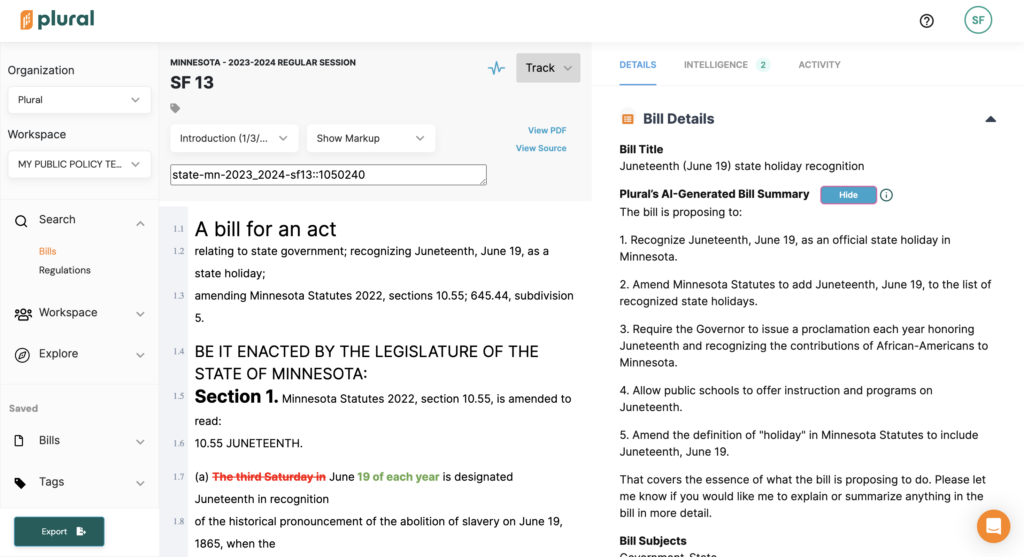
Plural’s AI-powered bill summarization tool condenses long, dense bill text into a short summary that retains the key details of the bill.
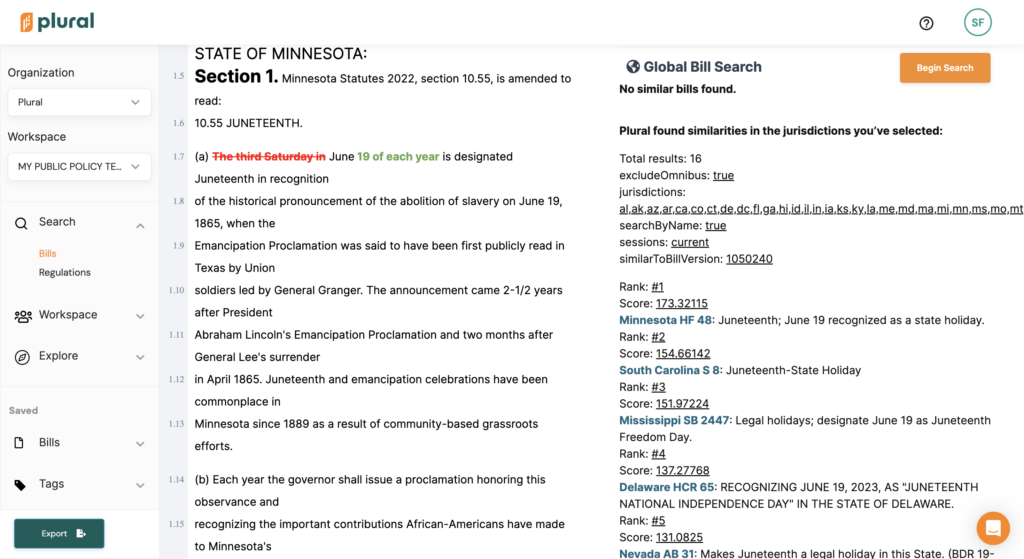
Use Plural’s Global Bill Search Tool to see whether similar bills have been introduced across multiple jurisdictions.
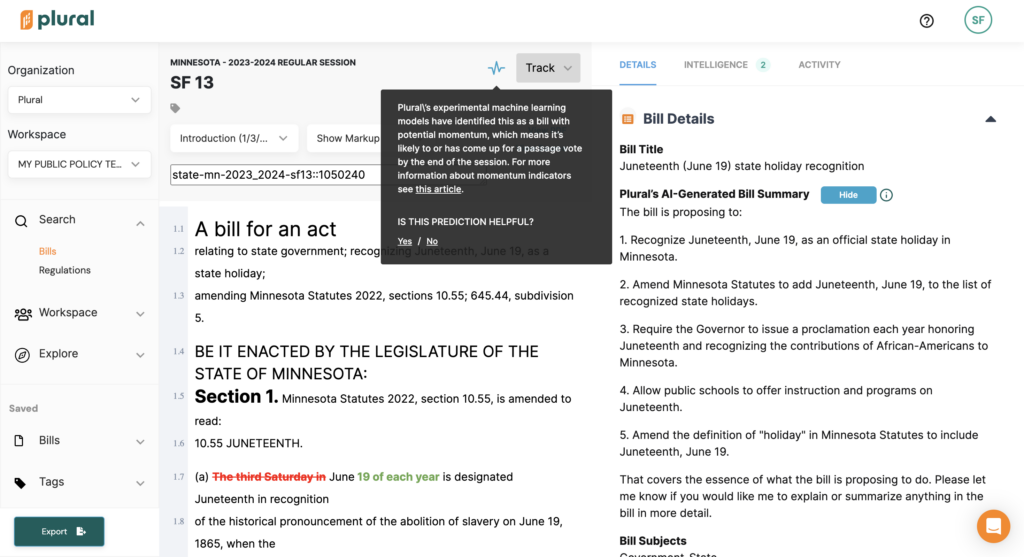
During the legislative session, use Plural’s Momentum Indicator to see which bills are likely to come up for a vote by the end of session.
Learn more from Amber, our Administrative Director:
Get Started With Plural’s AI-Powered Policy Tracker
With Plural’s AI-powered tools, it’s easier than ever to elevate your policy work from informed to insightful. Interested in learning how Plural can work for your team? Book a demo today!
The 2024 legislative sessions are right around the corner — is your team ready? When it comes to policy tracking tools in 2024, you have many options. Plural’s tailored solutions are perfectly catered to your team’s size, budget, and needs.
In 2022, total federal lobbying spending skyrocketed to $4.1 billion – the highest since 2010. With conglomerates dishing out millions of dollars to advocate for and against policies on both the state and federal levels, organizations with tighter budgets face an uphill battle.
Plural’s expanded legislative tracking, stakeholder management, and collaboration offerings come at a time when full participation in the policy creation is crucial. Plus, Plural is a minority and women-owned technology company that’s committed to innovation. When you choose Plural as your tool of choice, you won’t be getting an outdated legacy tool or supporting a company with a culture of just pandering to stakeholders. We are continually innovating ways to make our data impactful, and we’re committed to doing the right thing. Plural users are happy and productive.
Let’s dig into your options.
Plural Free Account
A free Plural account is perfect for the individual who wants to stay civically engaged on public policy. Thousands of Plural users take advantage of our free offering. With a free account, you’ll access best-in-class legislative data from 53 jurisdictions — all 50 United States, Washington, D.C., Puerto Rico, and U.S. Congress. You can also search and track bills across all 53 states and jurisdictions.
Worried that a free tool won’t be robust and accurate? The old rule of “you get what you pay for” is a thing of the past. Not only does Plural offer the most robust legislative data, but it’s also the most intuitive and easy-to-use tool on the market. We scrape our data more frequently than our competitors, with a custom cadence that’s catered to each legislature. With Plural, your days of getting caught with outdated information are over.
Think you’ll need more? Don’t worry — once you create a free account and start using Plural, you can upgrade anytime.
Plural’s Basic Plan is perfect for small teams who only need to track one jurisdiction, but still need expanded functionality.
With Plural’s Basic Plan, you can search and track bills in one state, get custom alerts for your tracked bills, and get real-time alerts on saved searches. It comes with full access to Plural for two users, who can create one collaborative workspace for notes, issue management, and more. Plus, you can create customizable markups, shared notes, and annotations on bills, and upload external files. Teams who use this tier really appreciate the high quality data and ability to collaborate.
We recently created our Basic Plan for those small policy teams that need to pack a punch. Sound familiar? In the world of public policy, being the first to know and getting your team on the same page as fast as possible is the key to success. Plural’s Basic Plan will help you achieve your goals. With our Basic Plan, we’ve taken our robust legislative data and paired it with powerful organization and collaboration tools. However, at the same time, we know that budget is often a pain point for small policy teams. That’s why our Basic Plan is just $3,500 per year.
Plural’s Premium Plan is perfect for multi-jurisdiction public policy teams, advocacy groups, and researchers. In addition to searching and tracking bills, organizing your work, and collaborating with your team, you can unlock revolutionary tools to deepen your policy insights and enhance your collaboration.
And with unlimited secure digital workspaces, you can create a home for every team, client, or campaign — annotate bills, share analyses, and plan next steps all in one place. What’s more, you can easily export your data for reporting and further analysis.Plural allows you to give up legacy systems and spreadsheets. Plus, we never charge per seat. With Plural, you can collaborate with anyone on your team (or even external stakeholders!) without concern for additional fees.
Plural Premium: Revolutionary AI-Powered Features
Plural’s AI-powered features are what really sets us apart from the competition. See what’s happening with similar legislation across the country, find out where bill language reappears over time, and even find out which bills are gaining momentum.
Here are a few highlights:
AI-Generated Bill Summaries: Save hours reading through long, dense bill text. Quickly understand and share the impact of proposed legislation
Related Bills: Quickly identify bills related to the one you’re viewing. See the relationship and the level of similarity, based on automated text analysis
Momentum Indicator: Discover which bills are likely to come up for a vote before the end of the legislative session.
Additional AI Insights: Discover companion bills, reintroduced bills, and omnibus bills to gain a deeper understanding of the legislative landscape.
Plus, soon, Plural will help you discover bill topics and version-to-version bill summaries with the power of AI. With Plural, you’ll never miss an opportunity to influence legislation.
Find similar bills and use Plural’s Global Bill Search Tool in the “Intelligence” tab of a bill detail page.
Plural’s AI-powered bill summarization tool condenses long, dense bill text into a short summary that retains the key details of the bill.
Plural Premium: Unmatched Customer Support
Finally, at Plural, we know successful policy work doesn’t happen in a vacuum — it’s a collective effort. That’s why we offer personalized, one-to-one customer support.
With Plural, you won’t feel lost in a big, complicated corporate structure. Your dedicated Customer Support Specialist is always available via chat or email. We offer free, unlimited onboardings and trainings to make sure your team is getting the most out of Plural.
Plus, Premium Plan users can also request custom reports and policy guidance from Plural’s knowledgeable team of Policy Experts. With Plural, it’s like having a team of legislative researchers, attorneys and policy experts working for you around the clock… without the price tag.
If you missed our product roadmap webinar, we just announced these new features that are available now to Plural users:
Vote data. Plural users can now see how a bill was voted on, or how Legislators have voted on certain bills in Plural right alongside your work. We want to help save you time tracking a bill’s movements, and also make it easy to share vote information in multiple formats, like a legislative scorecard for example. Vote data can be found both on a Bill or Legislator’s activity feed.
Federal staffer data. We know that managing relationships and discussing legislative priorities with lawmakers is critical, but can be labor-intensive. With Plural, up-to-date information you need is at your fingertips. You can find federal staffer data on our new “Staff Directory” tab right on the Legislator’s page. Plus, state staffer data is also coming soon!
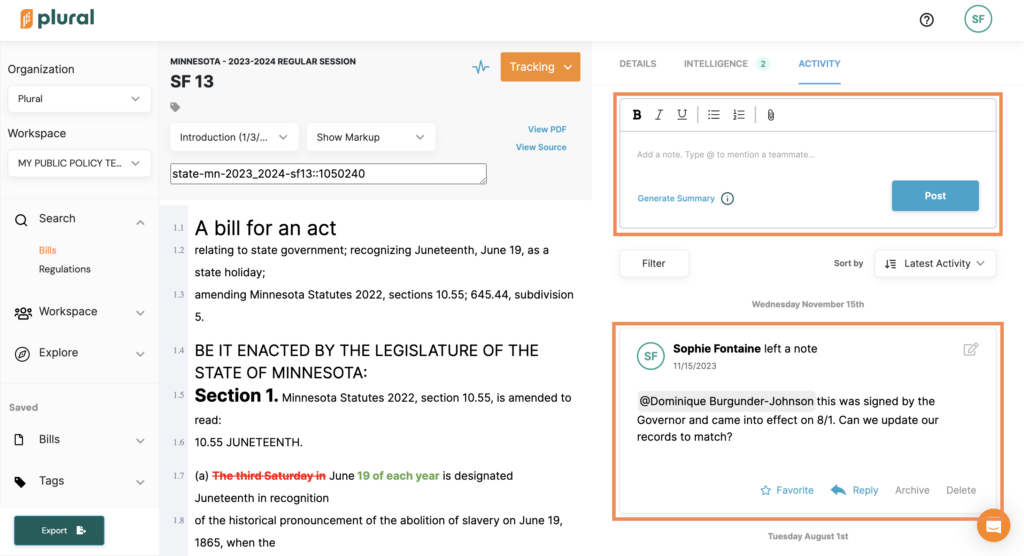
Mention teammates. Tag or “@” mention your teammates (similar to other collaboration or messaging software like Slack, Microsoft Teams) If there’s a particular update on a bill, legislator, or any other update that you want to flag immediately for your teammates, simply mention them in the activity feed. Tagged teammates get notified directly in their inbox with the context and information they need. We know that collaboration is a crucial part of public policy work, and hope that this feature and others helps facilitate smooth and effective collaboration within Plural.
Leading organizations trust Plural for their legislative tracking, stakeholder collaboration, and organizational needs. Our partners include the Associated Press, Google, and many advocacy organizations across the globe. With Plural, it’s like having a team of legislative researchers, attorneys and policy experts working for you around the clock… without the price tag.
Interested in getting started? Dig deeper into our pricing plans, create a free account, or get started with your Basic or Premium plan today.
In the world of public policy, staying organized and informed is vital. That’s where Plural’s public tags come in. This innovative feature transforms how policy teams manage, categorize, and communicate legislative information. By offering a clear, customizable system to tag and share legislative bills, Plural’s public tags are an indispensable tool in the hands of policy professionals.
The Value of Plural’s Public Tags
Why are public tags so crucial? They provide a streamlined way to sort and prioritize legislative bills, enhancing both internal workflow and external communication. Whether you’re aligning your team on high-priority issues or informing stakeholders about key legislative developments, Plural’s public tags offer a simple yet powerful solution.
Learn more from Ruby, our VP of Product:
Get Started With Plural
Interested in getting started with Plural? Public tags are available to users of our Premium plan, along with premium data, innovative AI features, and top-tier customer support. Learn more and get started today.
In an era where public policy impacts every sector, understanding legislation is crucial. Policy professionals, academics, and interested citizens alike need robust tools for legislative research. Having the right tools can transform complex data into actionable insights. Innovative tools are reshaping how we interact with legislative documents. In particular, Plural’s premium data and advanced tools can revolutionize your legislative research.
What is Legislative Research?
Legislative research involves the comprehensive study of congressional documents. This can include analyzing bills and other legislative materials. This research seeks to understand the intent, application, and potential implications of policy. Legislative research helps us understand and contextualize our policy landscape. This includes existing laws, proposed bills, and historical legislation.
Understanding the Legislative Process
The legislative process in the United States is intricate. Understanding how ideas transform into policy is key to engaging with our government. This journey involves many steps, from the introduction of a bill to its enactment as law. Understanding this flow is foundational for effective legislative research.
Legislative research can seem daunting. Thousands of bills are introduced each session. Plus, there are dozens of jurisdictions and decades of past sessions to explore. This is where the value of robust data is clear — comprehensive data is key to successful research. Researchers need a tool that synthesizes data and presents it in an intuitive manner.
Steps in the Legislative Research Process
Define the Scope
Determine the focus of your research. This could be a specific piece of legislation, a policy area, or a legislative session.
Gather Primary Sources
Start with direct links to legislative documents. This includes bills, statutes, and committee reports.
Explore Secondary Sources
These provide analyses and interpretations of legislative intent. Secondary sources are invaluable for deeper insight.
Analyze and Synthesize
Cross-reference materials to build a comprehensive view of the subject.
Stay Updated
Legislative action is a dynamic process. Use reliable tools to keep abreast of new developments.
Tools for Legislative Research
Several tools can enhance legislative research. For instance, state legislative websites offer direct access to a plethora of documents. Libraries and government archives provide historical data that’s crucial for understanding legislative context. Subscription databases can also serve as powerful tools, offering sophisticated search options.
Plural for Legislative Research
Plural takes legislative research to the next level. It offers features designed for thorough analysis and efficient workflow. Plural is the tool of choice for many researchers.
Advanced Search
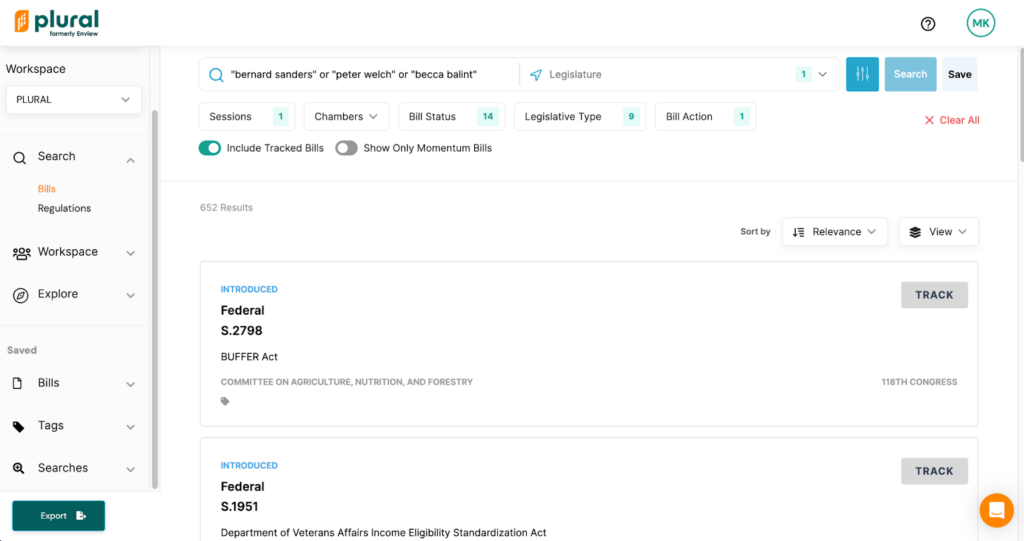
Plural’s advanced search options allows users to pinpoint relevant legislation. Use specific search phrases to narrow your search, or explore via various filters.
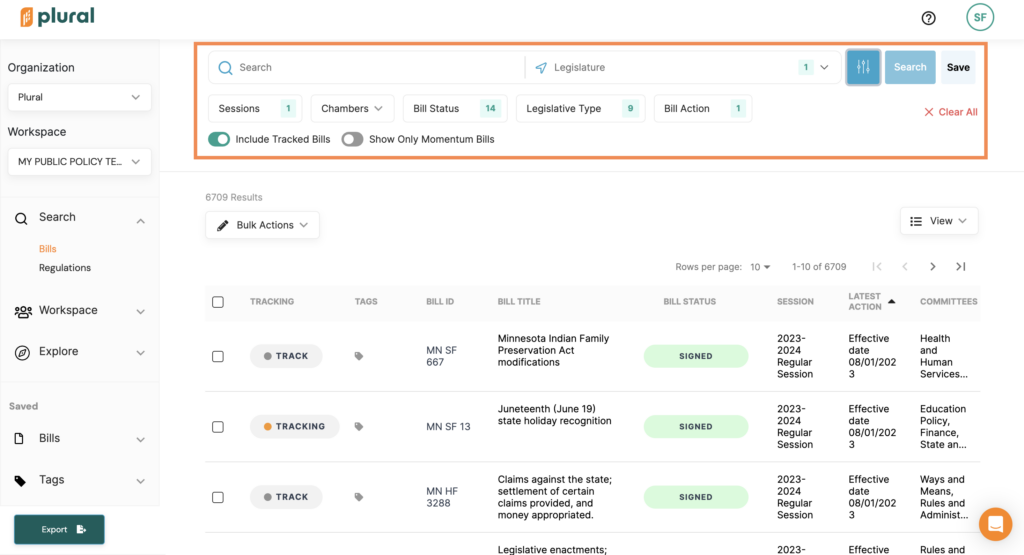
Filter your search result by session, chamber, bill status, legislative type, bill action, and more.
Annotation Tools and Notetaking
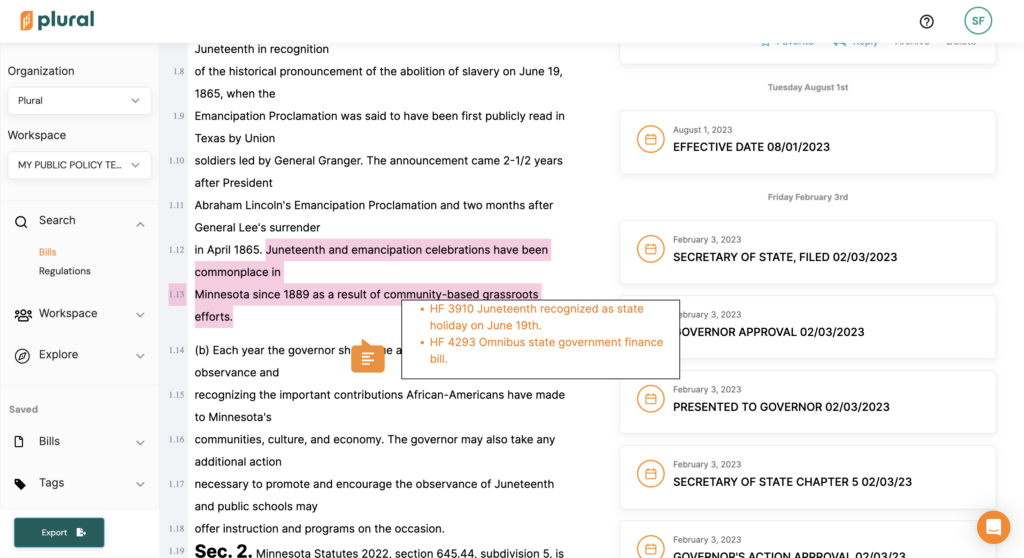
Interact with legislative data using Plural’s annotation tools. You can highlight, make notes, and compile your insights right on the platform.
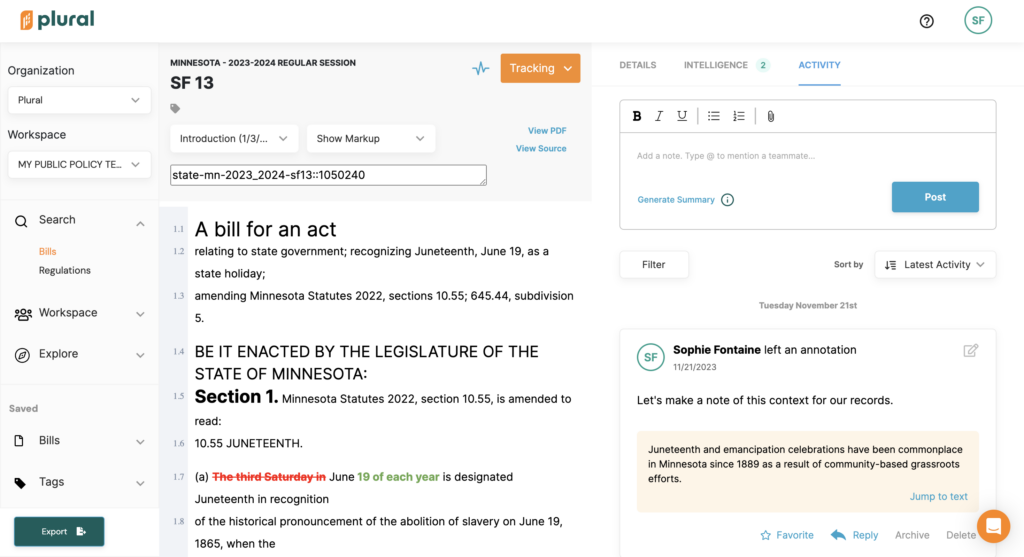
Leave notes, mention teammates, attach files, generate AI-powered summaries, and more, all in the Activity tab on a Bill Detail page.
Interact directly with bill text and discover related bills to unlock the legislative landscape of an issue area.
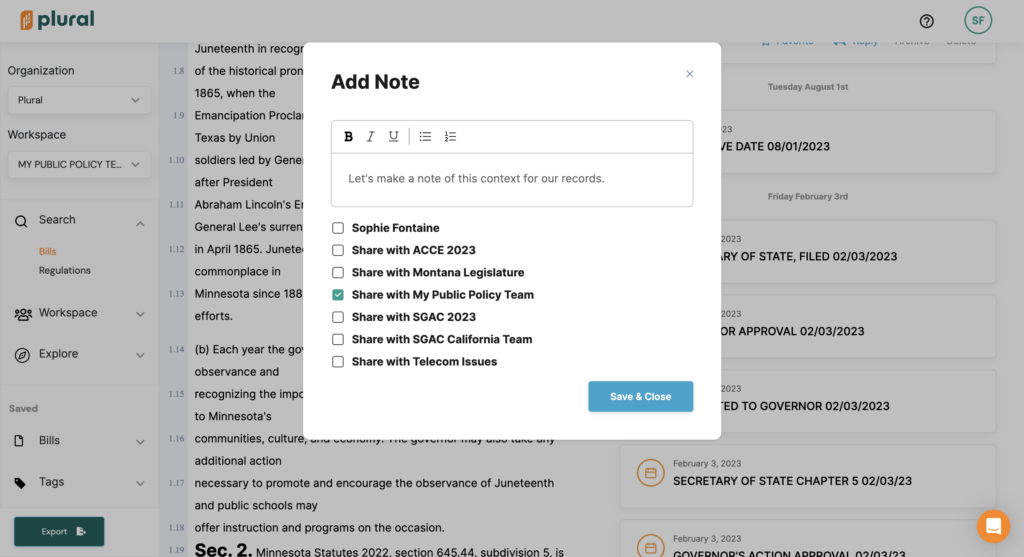
Annotate bill text and choose which workspace(s) to share your notes with.
Annotations will appear in the Activity tab on a bill detail page.
Workspaces
Plural’s secure digital Workspaces enable seamless collaborative efforts, streamlining shared projects with teammates. Your Workspace houses any and all details related to the bills your team is tracking, the tags you’ve created, the searches you’ve saved, and any activity you’ve generated in Plural.
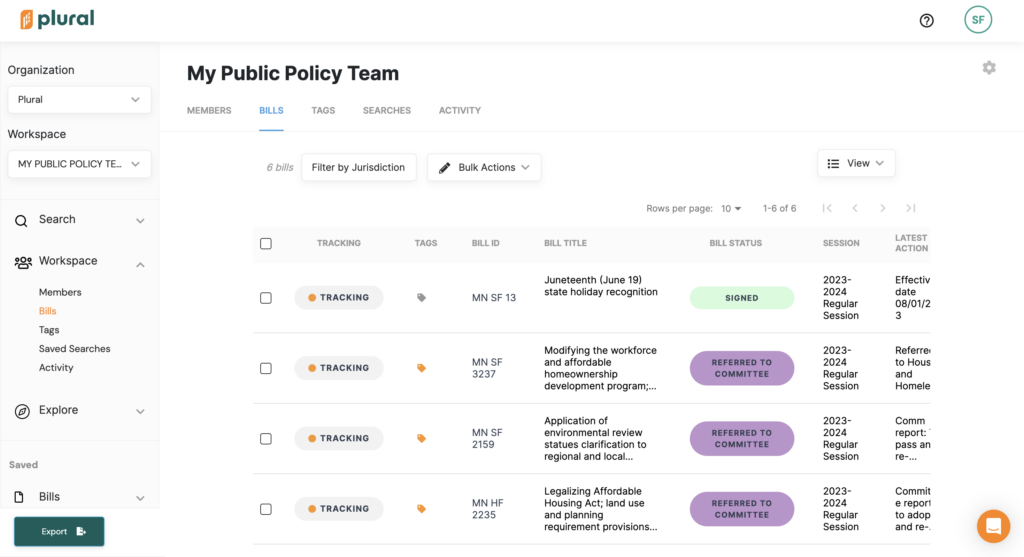
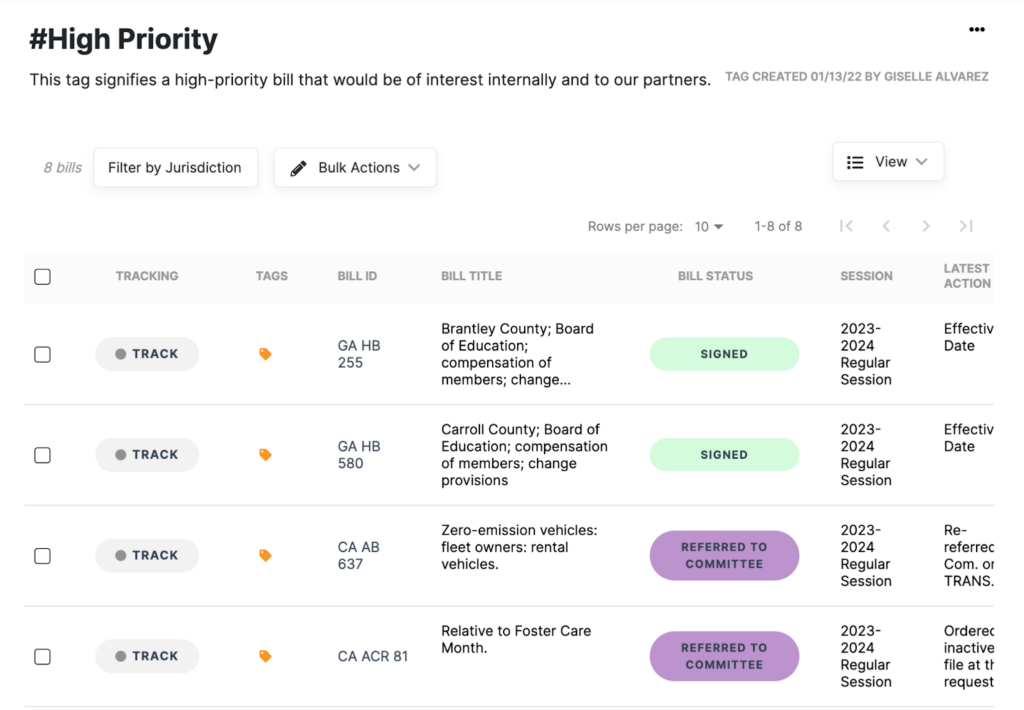
View the bills your team is tracking, their title, status, session, and latest action, all in one place. Find this information on the Bills tab of your Workspace page.
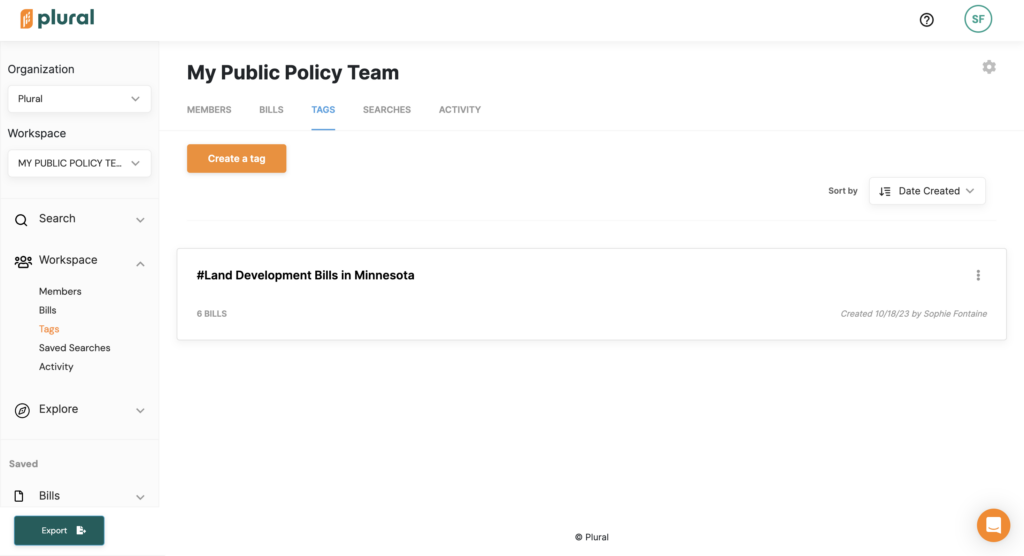
Create custom tags to organize and categorize bills. Find any tags your team has created in the Tags tab of your Workspace page.
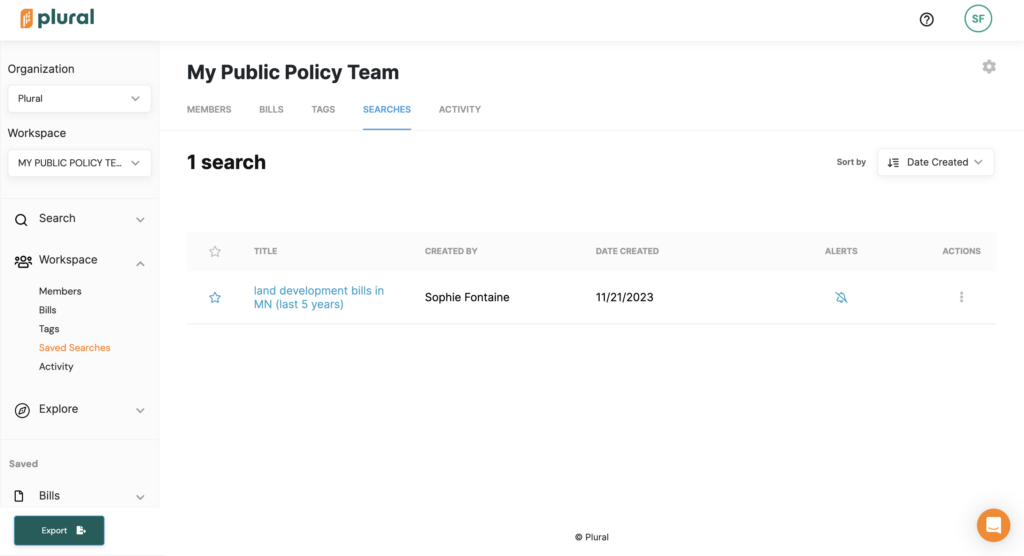
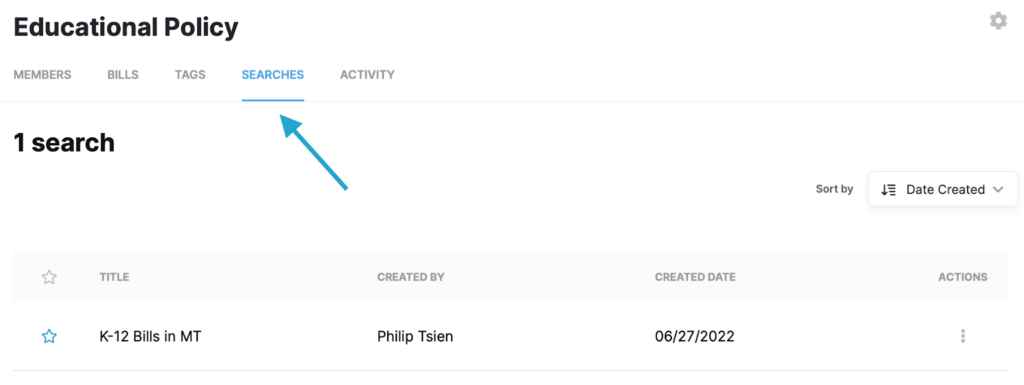
Save your searches and get notified of new results. Find your team’s saved searches in the Searches tab of your workspace.
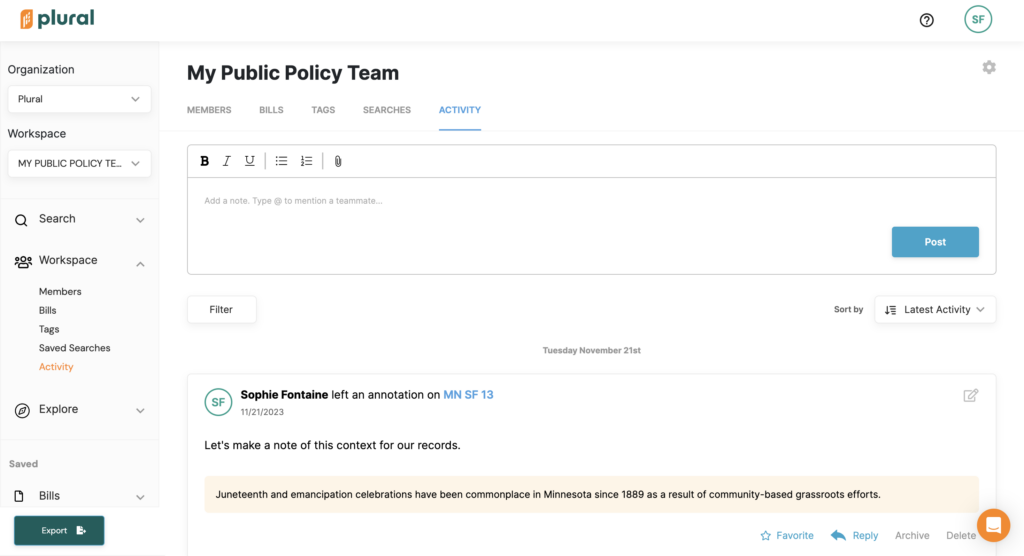
Get a glimpse of all of the activity your team has created, all in one place. This includes annotations, notes, mentions, uploads, and more. Find this in the Activity tab of your workspace page.
Comprehensive Legislative Histories
Plural contains session data dating back decades. Delve into historical context, an essential aspect of understanding legislative trends.
Single-State Subscription
Plural provides tailored solutions, including single-state subscriptions for focused research.
Navigating the legislative environment doesn’t have to be daunting. Accessing the right tools simplifies this process. The correct tools can make legislative research streamlined, informative, and even enjoyable.
Plural stands out as a transformative tool for legislative research. At Plural, we’re committed to empowering professionals to conduct thorough, efficient legislative research. Our tools help policy pros find what matters, get organized, collaborate effectively, and even dig deeper.
Interested in learning how Plural can work for your legislative research needs? Create a free account or book a demo today!
Plural’s advanced features can streamline your public policy work, helping you easily find what you’re looking for and allowing you to amplify your impact.
How does Plural help you find what you’re looking for?
Use advanced search features to narrow down your query
Save your searches and get notified of new results
Harness the power of AI powered tools to discover bills with momentum and similar bills
Learn more from Dominique, our director of CX Design!
Several of Plural’s advanced features can save you hours of time spent on manual tasks, so that you can spend more time on strategy and planning (and spend less time working overall!)
Digging Into Plural’s Advanced Features
Save Your Frequently Used Searches
Plural’s Saved Search feature allows you to save your frequently used searches. You’ll receive email alerts as new updates are available for your search criteria.
All saved searches are dynamic, so they’ll get updated as new legislative data becomes available. For example, as legislatures introduce new bills that match your saved search criteria, those bills will appear as results.
View Critical Information for Many Bills in One List
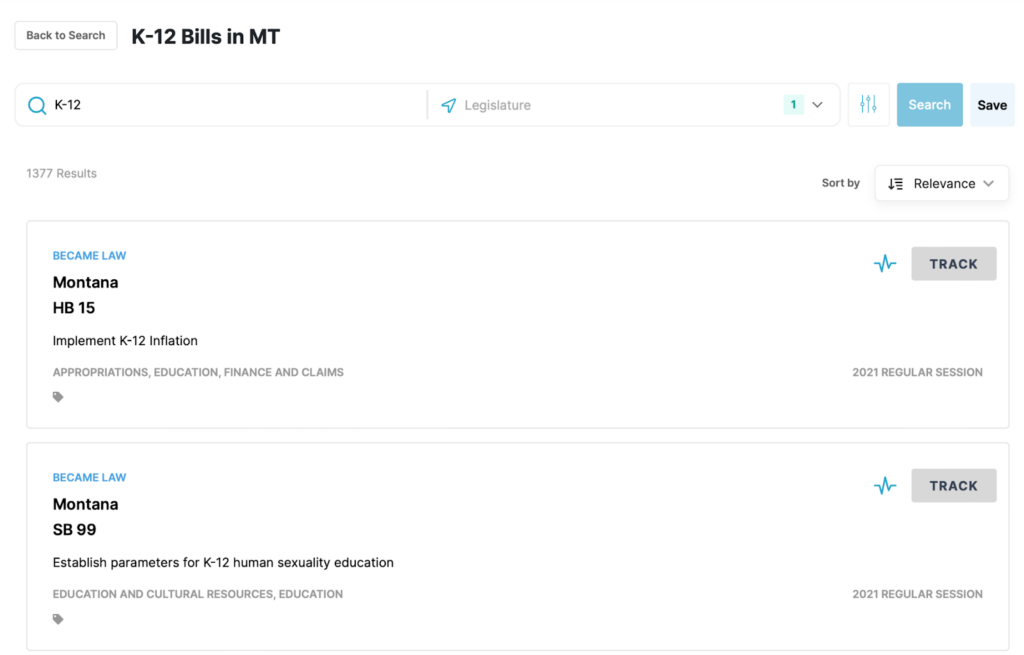
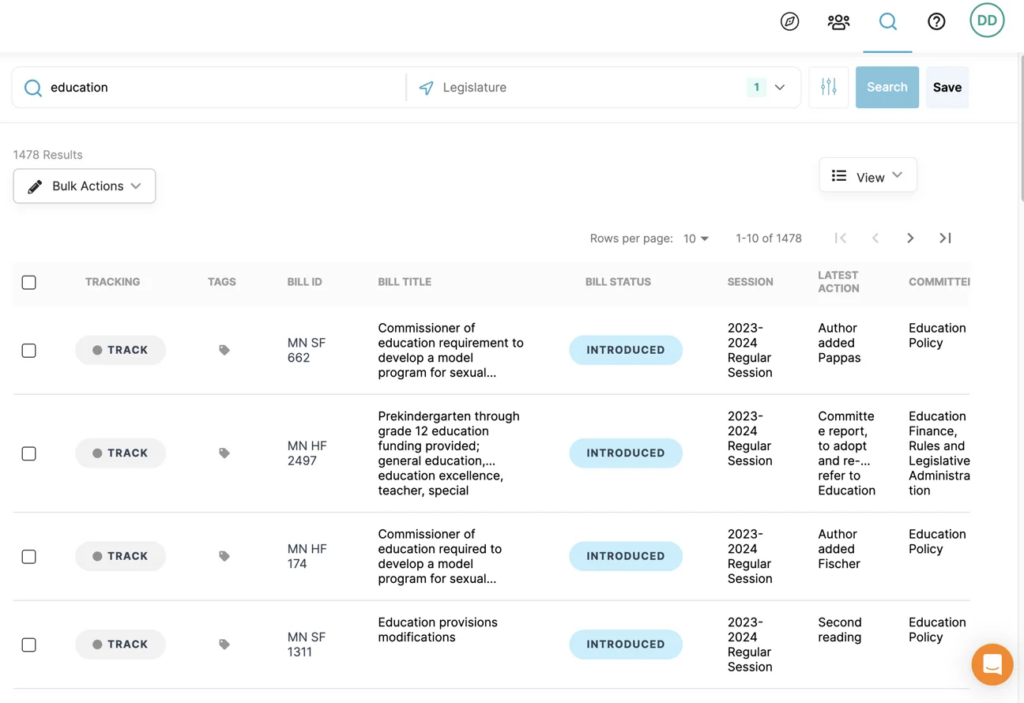
In Plural, you can choose to display your list of bill search results and tracked bills in “Table View” or “Cards View.”
Cards View lists key bill information, including the bill’s title, ID, session and committee. Table View adds to this information with bill status and latest action, in an easily skimmable format.
Table View saves you from having to click into individual bill pages one by one to get the most critical details about each bill.
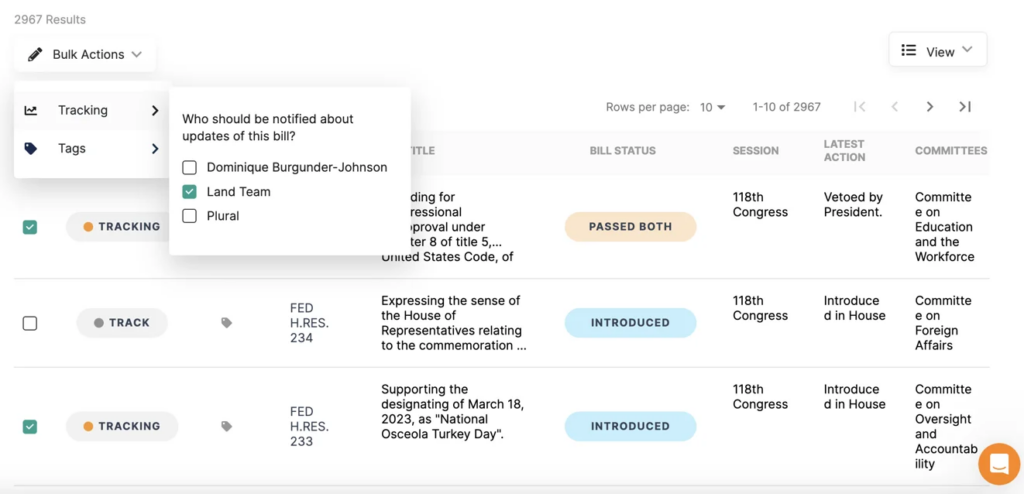
Track Many Bills at Once
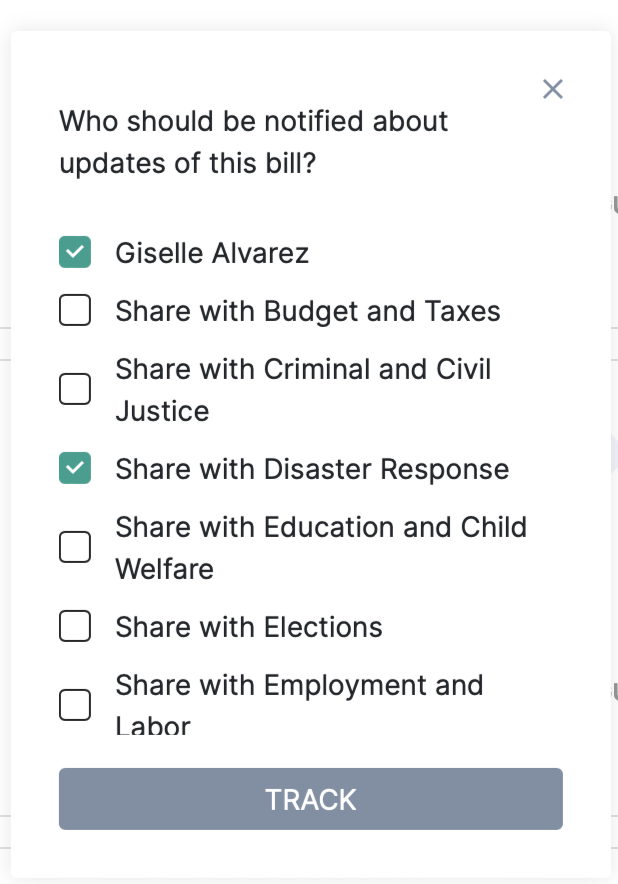
Tracking a bill in Plural allows you to keep a running list of all of your bills of interest in a single place. You’ll receive email alerts whenever there’s an update on any of your tracked bills.
When viewing a list of bill search results in Table View in Plural, you can select multiple bills to track at once.
With this same functionality, you can also quickly un-track multiple bills at once. This can be especially handy when cleaning out your Workspace in preparation for the next session.
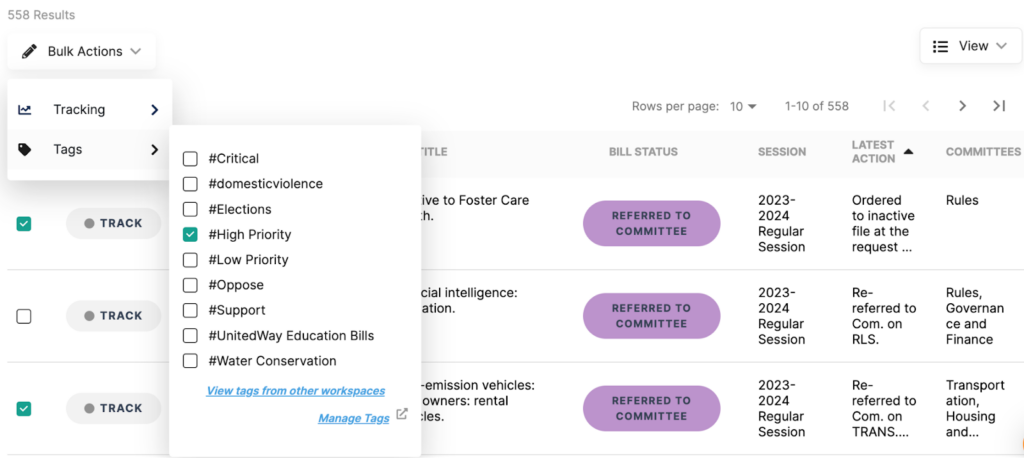
Organize Many Bills into Multiple Virtual Folders at Once
In Plural, “Tags” are like virtual folders that you can organize your bills of interest into.vFor example, you can use Tags to label bills based on high priority/low priority, support/opposed, or by issue area.
When viewing a list of bill search results in Table View, you can select multiple bills to assign a tag to at once.
As with tracking, you can also un-tag multiple bills at once. Again, this can be especially handy when cleaning out your Workspace ahead of the next session.
BONUS: To keep a record of your tracked bills from past sessions, create a new tag with the session year and bulk-tag all of the bills before untracking them. This will create a new tag on the left sidebar with all of the bills you worked on in previous session(s), making it easy to access and reference them later.
Easily Share an Interactive List of Bills with External Audiences
Publishing a Tag allows you to quickly and easily share a group of bills with anyone, regardless of whether they have a Plural account. This can be especially useful when generating reports for external stakeholders, like clients and organization supporters.
Tags are fully customizable, and you can create as many as you’d like. Use tags to organize bills into categories such as “high priority/low priority,” “support/oppose,” or by topic area, like “education” or “housing.” After creating your tags, you can then assign one or more of the tags to your relevant bills. Then once you’ve published the tags, you can simply share the URL for the public tag in an email, website or text message.
When someone visits the link for your public tag, they’ll be able to click on any of the listed bills to view the bill page. This page includes full text of the bill as well as the bill’s author/cosponsor, status, committee, actions and vote history.
Find What You’re Looking For With Advanced Search Options
Using Plural’s filters and search preferences can be key to finding what matters to you. With Plural, you can narrow your search by legislature, session, bill status, and bill action.
Plus, you can use boolean operators such as quote marks, the “OR” operator and the “AND” operator to more quickly find what you’re looking for.
Identify Bills With the Highest Chance of Coming Up for a Vote
Thousands of bills are introduced each session, and sifting through them is labor intensive and time consuming. Plural’s AI-powered “Momentum Indicator” makes it easy to find what matters.
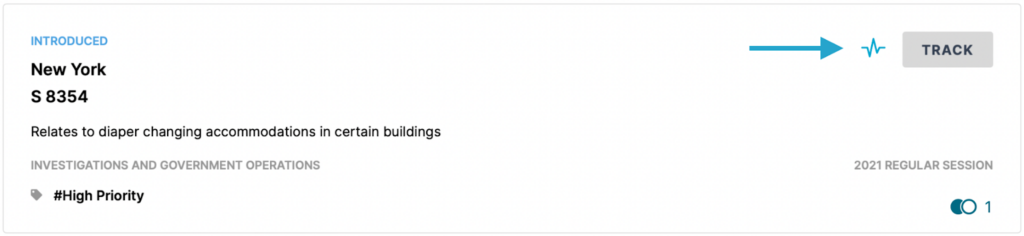
Bills with potential momentum will have a pulse icon next to the “Track” button and on their bill page.
You can also filter your search results to show only bills with potential momentum.
Find Companion and Other Related Bills All in One Place
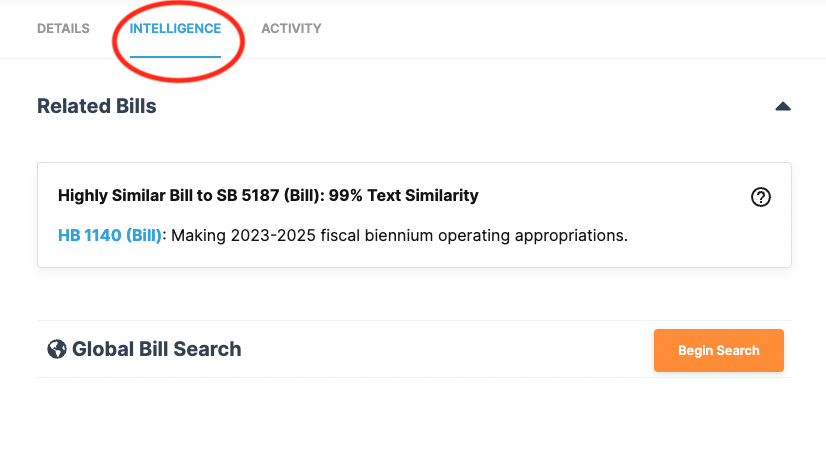
Within the “INTELLIGENCE” tab on a bill page, you’ll see any bills that share text with the bill you’re currently viewing. This is a quick and easy way to find companion bills or an ominous package.
Plural will also indicate the degree of text similarity between the related bill and the bill you’re viewing. This will give you an even clearer sense of the relationship between two or more related bills.
Discover Similar Bills Across Multiple Jurisdictions
Plural’s Global Bill Search tool helps you quickly analyze bill text and find commonalities in bills across all jurisdictions.
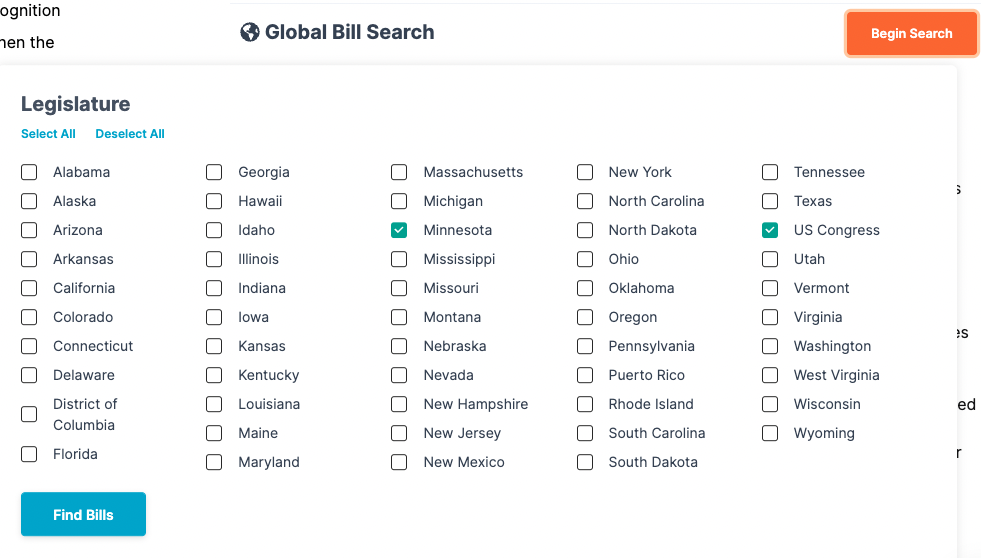
Within the “INTELLIGENCE” tab, you’ll find the Global Bill Search tool. In the Global Bill Search tool, you can select the legislatures in which you’d like to search for bills similar to the one you’re currently viewing.
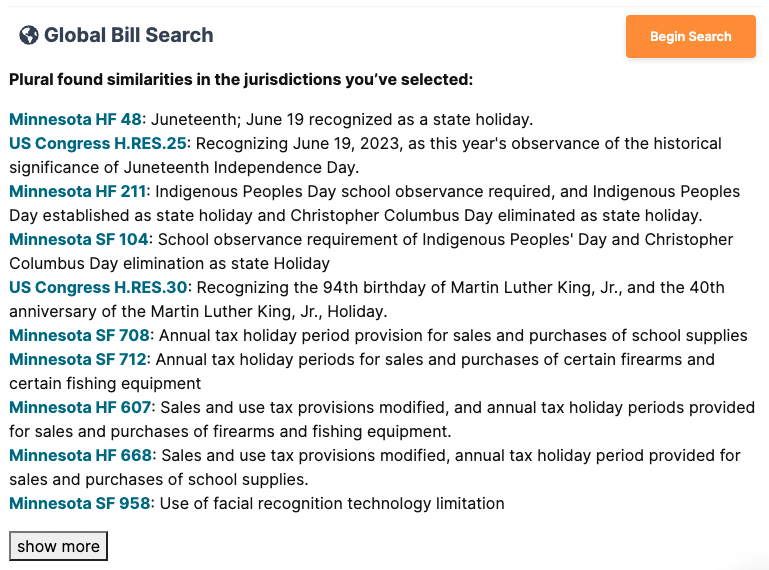
After completing your search, you’ll be shown a list of bills from your selected legislatures containing a high degree of similar text.
Keep Individual and Shared Work Separate
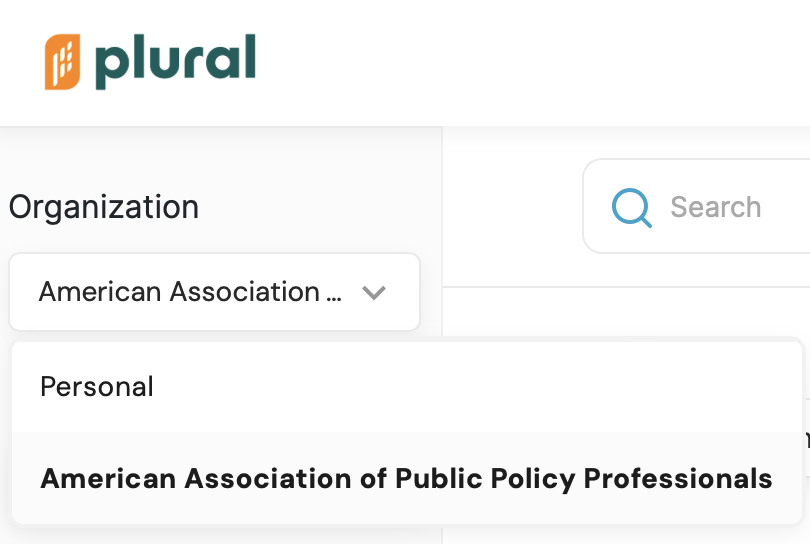
Plural allows you to have a personal organization, in addition to your shared organization. In your shared organization, you can collaborate with colleagues on work. Your personal organization is for your own work and is not shared with others.
Within your personal organization, you can track bills, create tags, and save searches that will only be visible to you.
When working within your shared organization, you can share actions with any of your shared workspaces, or your personal workspace. This helps you avoid navigating back and forth between the two organizations.
Get Started With Plural’s Advanced Features
With Plural’s advanced features, it’s easier than ever to shape the future of public policy. Harness the power of Plural’s intuitive, AI-powered legislative tracking and stakeholder collaboration tool and get started today.
The next legislative sessions will be here before we know it, and the time to finalize your policy tracking tools and systems is now. It’s easier than ever to explore Plural’s pricing plans with our new video explainer.
No matter your needs, we have a plan just for you. From premium legislative data and tracking across dozens of jurisdictions to AI-powered tools and top-tier customer support, Plural ensures you never miss a beat.
Here’s how Plural can level up your policy impact:
Search and track best-in-class legislative data 🔎
Be the first to know with customizable alerts 🔔
Unlock revolutionary AI-powered tools 🧠
Keep your team on the same page 🤝
Report more efficiently and share your value 📈
Learn More About Plural’s Pricing Plans
Free Account
With a free account, you’ll gain access to core features for all 53 U.S. states and jurisdictions for one person. It’s perfect for the interested constituent getting started with policy tracking.
Basic Plan
Plural’s Basic plan is just $3,500 per year. It was designed with small policy teams in mind. You’ll get two user accounts, unlock advanced features for one state or jurisdiction, and one collaborative workspace to get organized and work seamlessly with your team.
Premium Plan
For those needing a comprehensive, full-service solution, Plural’s Premium plan starts at $10,000/year. It’s tailored for larger teams, advocacy groups, and researchers and boasts unlimited users, multi-state and even international tracking, AI-powered tools to deepen your insights, premium data to advance your strategy, and top-tier customer support.
Get Started Today
Ready to get and stay ahead in the public policy landscape? Learn more about our pricing plans and get started today!